Hi,
I was watching this video tutorial about Building a Native Correlation Plot in Power BI.
The guy mentioned that the data source is located here:
https://cran.r-project.org/web/packages/explore/vignettes/explore_mtcars.html
The power bi file is this:
Correlation matrix.pbix (41.1 KB)
I was not able to figure out what is the source file that is being used.
But I thought to ask because maybe it is included in a format that I do not follow or do not understand.
Thanks,
Mohamed GadAllah
@MGadAllah The data source maybe that website but what he did is load the data into model, copy that table and then pasted it and loaded once again in PQ so that users don’t face any problems.
1 Like
Hi @AntrikshSharma
Thanks for your valuable time replying to my thread.
Sometimes I feel that my problem is that I am always trying to understand and not just copy and paste things, and I am just do not want to make it like plug and play.
I am afraid that my question is not about copy the table or extract the table.
My point is that where did he got the data set source from?
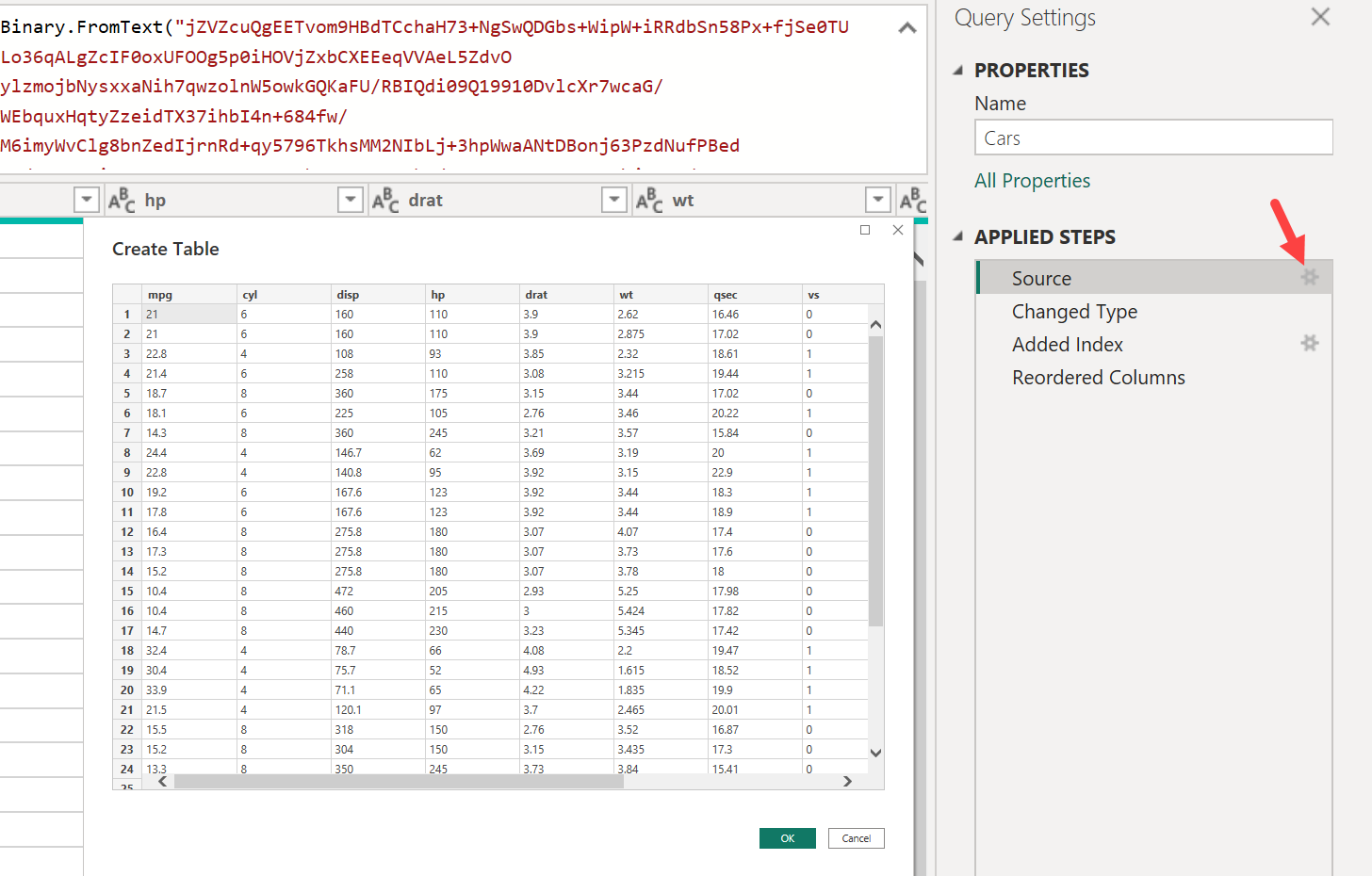
When I explored the power query editor for different queries and different tables I did not find any clear source except what is within the advanced editor.
When you open the advanced editor, you will find this:
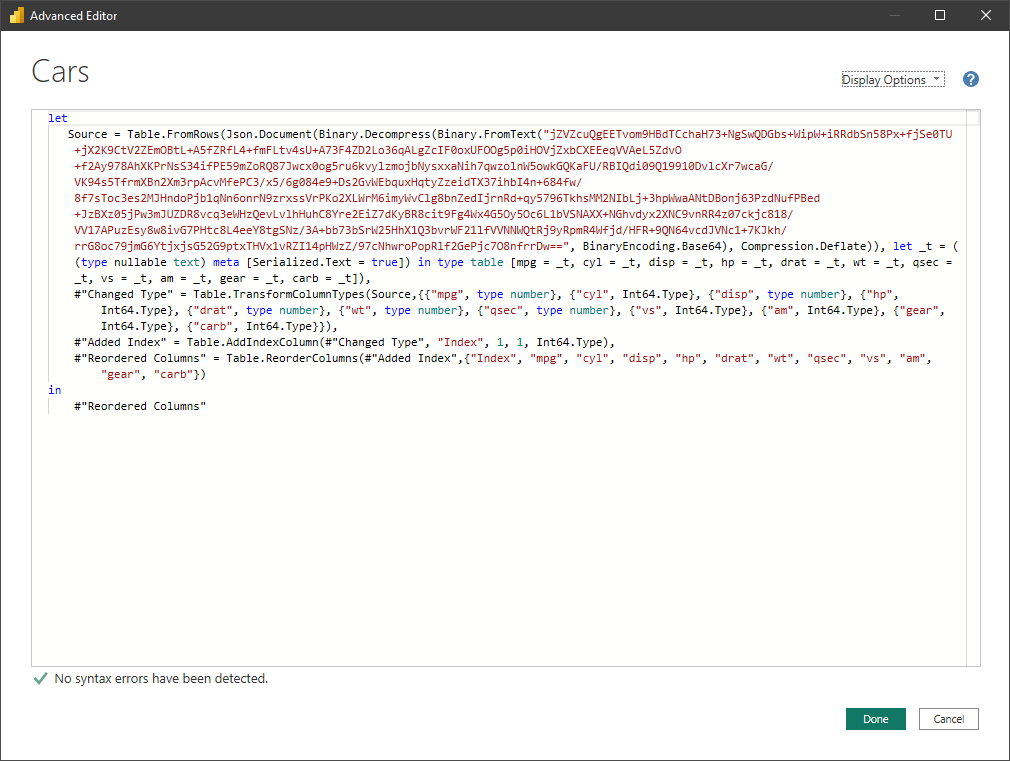
Now when I look into details you can find these parts:
-
Table.FromRows
-
Json.Document
-
Binary.Decompress
-
Binary.FromText
-
("jZVZcuQgEETvom9HBdTCchaH73+NgSwQDGbs+WipW+iRRdbSn58Px+fjSe0TU+jX2K9CtV2ZEmOBtL+A5fZRfL4+fmFLtv4sU+A73F4ZD2Lo36qALgZcIF0oxUFOOg5p0iHOVjZxbCXEEeqVVAeL5ZdvO+f2Ay978AhXKPrNsS34ifPE59mZoRQ87Jwcx0og5ru6kvylzmojbNysxxaNih7qwzolnW5owkGQKaFU/RBIQdi09Q19910DvlcXr7wcaG/VK94s5TfrmXBn2Xm3rpAcvMfePC3/x5/6g084e9+Ds2GvWEbquxHqtyZzeidTX37ihbI4n+684fw/8f7sToc3es2MJHndoPjb1qNn6onrN9zrxssVrPKo2XLWrM6imyWvClg8bnZedIjrnRd+qy5796TkhsMM2NIbLj+3hpWwaANtDBonj63PzdNufPBed+JzBXz05jPw3mJUZDR8vcq3eWHzQevLvlhHuhC8Yre2EiZ7dKyBR8cit9Fg4Wx4G5Oy5Oc6L1bVSNAXX+NGhvdyx2XNC9vnRR4z07ckjc818/VV17APuzEsy8w8ivG7PHtc8L4eeY8tgSNz/3A+bb73bSrW25HhX1Q3bvrWF21lfVVNNWQtRj9yRpmR4Wfjd/HFR+9QN64vcdJVNc1+7KJkh/rrG8oc79jmG6YtjxjsG52G9ptxTHVx1vRZI14pHWzZ/97cNhwroPopRlf2GePjc7O8nfrrDw=="
Then starting from here:
BinaryEncoding.Base64), Compression.Deflate)), let _t = ((type nullable text) meta [Serialized.Text = true]) in type table [mpg = _t, cyl = _t, disp = _t, hp = _t, drat = _t, wt = _t, qsec = _t, vs = _t, am = _t, gear = _t, carb = _t]),
You just find some settings about above steps.
So, my point does the source is something included in step number 5?
I do understand that steps from 1 to 4 represent a workaround to dive into any source to extract what I need, but still the same question what is the real source?
is it that mentioned in number 2 above?
I mean 2. Json.Document?
or it is something else?
I do hope that I was able to express my point correctly.
Thanks
Mohamed GadAllah
@MGadAllah That’s what i explained, he originally loaded data using R from that website, but to ensure that those who are downloading the file do not face any issue he removed the Query that uses R and instead loaded data into PQ using copy paste/Enter Data option. That Table.From(Json.Document step is generated whenever you use the Enter Data option in UI.
1 Like
Thanks a lot, @AntrikshSharma .
May you tell me more about this technique or if there is a source to learn it in more detail that would be awesome.
Also, is there any way like a reverse way to retrieve or regenerate the query that he removed? As it happened a lot when I worked with files there were some deleted queries.
Thanks a lot.
Mohamed GadAllah