Welcome to the forum – great to have you here!
This is one of those problems where if you ask five people, you’ll probably get five different and equally valid approaches. Here’s the way I usually handle these, using a combination of a small virtual table and the HASONEVALUE() function:
Total Est =

 VAR vTable =
 ADDCOLUMNS(
     SUMMARIZE(
         'Customer ship Target',
         'Customer ship Target'[Customer]
        ),
    "vToTEst", [Est Row Value]
 )

VAR Result =
 IF( HASONEVALUE( 'Customer ship Target'[Customer] ),
    [Est Row Value],
    SUMX(
        vTable,
        [vToTEst]
    )
 )

 RETURN
 Result
The first variable creates a virtual table of two columns - your unique customer values, and your simple estimated value product measure.
The second variable tests whether you are in a data row of the table (HASONEVALUE on customer is true) or the total row (HASONEVALUE on customer is false). In the first case, it returns your measure, but for the total row it returns the sum of those measures over all customers in the virtual table created above.
And here’s what it looks like put together back in the visual – now with the correct total.
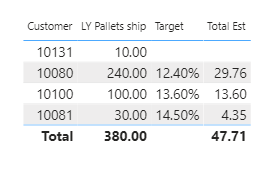
I hope this is helpful. Full solution file posted below.
- Brian
eDNA Forum - test total solution.pbix (420.8 KB)
HASONEVALUE is one of the most useful tools in the DAX toolbox: