Hi,
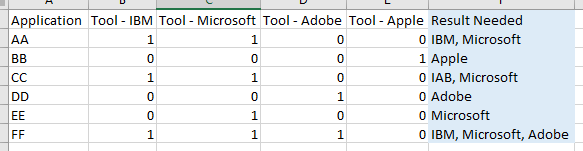
I have a basic table where multiple columns have a 1 or 0 depending on if an Application is Monitored by a Tool. I new a single column that calls out all the tools an Application has. If there is a one in the column i just need that tool name to appear in the new column.
EDNS Calculated Column.pbix (19.4 KB)
Calculated Tools Colum.xlsx (17.6 KB)
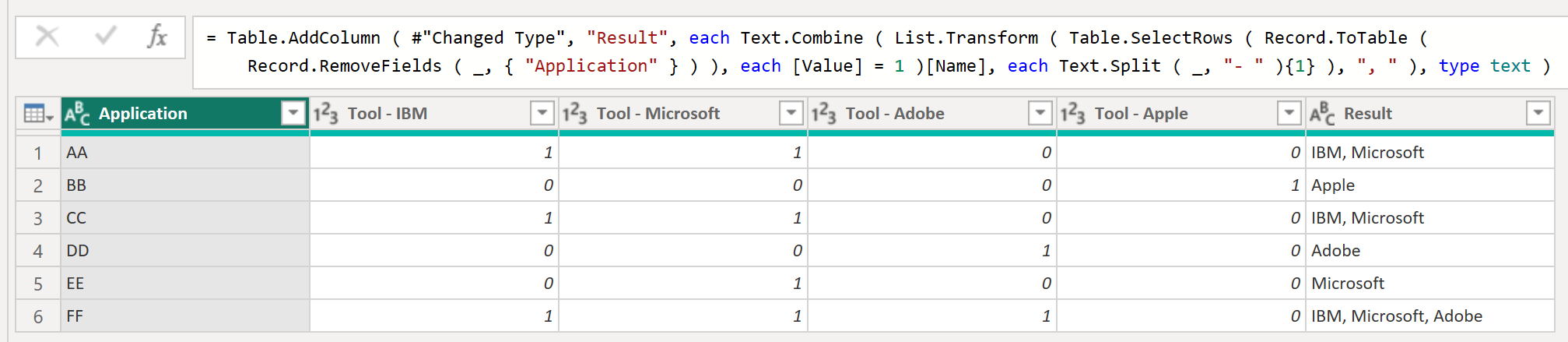
@chad.sharpe This job is best suited for Power Query.
    ChangedType = Table.TransformColumnTypes (
        Source,
        {
            { "Tool - IBM", Int64.Type },
            { "Tool - Microsoft", Int64.Type },
            { "Tool - Adobe", Int64.Type },
            { "Tool - Apple", Int64.Type }
        }
    ),
    AddedCustom = Table.AddColumn (
        ChangedType,
        "Result",
        each Text.Combine (
            List.Transform (
                Table.SelectRows (
                    Record.ToTable ( Record.RemoveFields ( _, { "Application" } ) ),
                    each [Value] = 1
                )[Name],
                each Text.Split ( _, "- " ){1}
            ),
            ", "
        ),
        type text
    )
2 Likes
Can you add the PBX result, I can’t replicate what you have done here. It looks like you are changing the column types to Int64 as the first step? In the PBX they are already Int?
The PBX would help me go through the steps.
Thanks
Chad
@chad.sharpe just use the last step of code in your file, i used changed type because I copied the table from model and pasted in PQ.
Hello @chad.sharpe
Did the responses above help solve your query?
If not, can you let us know where you’re stuck and what additional assistance you need?
If it did, please mark the answer as the SOLUTION by clicking the three dots beside Reply and then tick the check box beside SOLUTION
Thank you
I don’t understand what you are saying? I’ve spent more time trying to piece this together? I’m not sure if you are adding a new custom column in PowerQ? Are you able to add it to the PBX and upload it here?
Hi,
No it didn’t resolve the question. I’m sure the solution answer is correct, but I cant figure out how to add it in the PBX, so unfortunitly it’s not of much value to me.
Thanks…
Seeing it now in PowerQ i get what you mean by using the last step. I couldn’t visualize it, but i understand it now.
Great solution…
Thanks