Hi,
I have a similar case to the one shown in the following video Calculate The Difference In Days Between Purchases Or Events In Power BI Using DAX, but in my case, a request has different steps that can be associated with different instances. At the beginning, all the steps have the same date, which is the date of step 0, and they change when a step is executed, but the rest of the steps remain with the date of step 0 until they are executed.
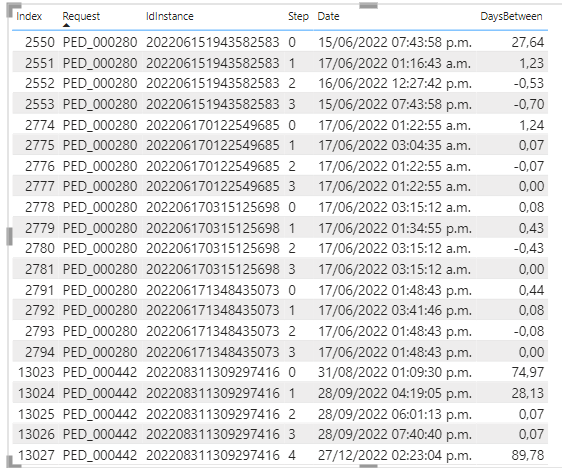
What I did was use the measure of the video by adding an index column to my table (Data) but what i need is that in the differents step 0 my result always be zero or not do any calculation, as well as in the steps that have not yet been executed (date of step 0) I need the result to be zero until the date changes.
Measure:
DaysBetween =
VAR _vIndexNum = MAX( Data[Index] )
VAR _vPreviousIndexNum = CALCULATE( MAX( Data[Index] ) , FILTER( ALLSELECTED (Data), Data[Index] < _vIndexNum ) )
VAR _vCurrentDate = VALUE( SELECTEDVALUE( Data[Date] ) )
VAR _vPriorDate = VALUE( CALCULATE( SELECTEDVALUE( Data[Date] ), FILTER ( ALL ( Data), Data[Index] = _vPreviousIndexNum ) ) )

RETURN

IF( _vIndexNum = CALCULATE( MIN(Data[Index]), ALLSELECTED(Data) ),
    0,
     _vCurrentDate - _vPriorDate
)
Result:
Result that I need:
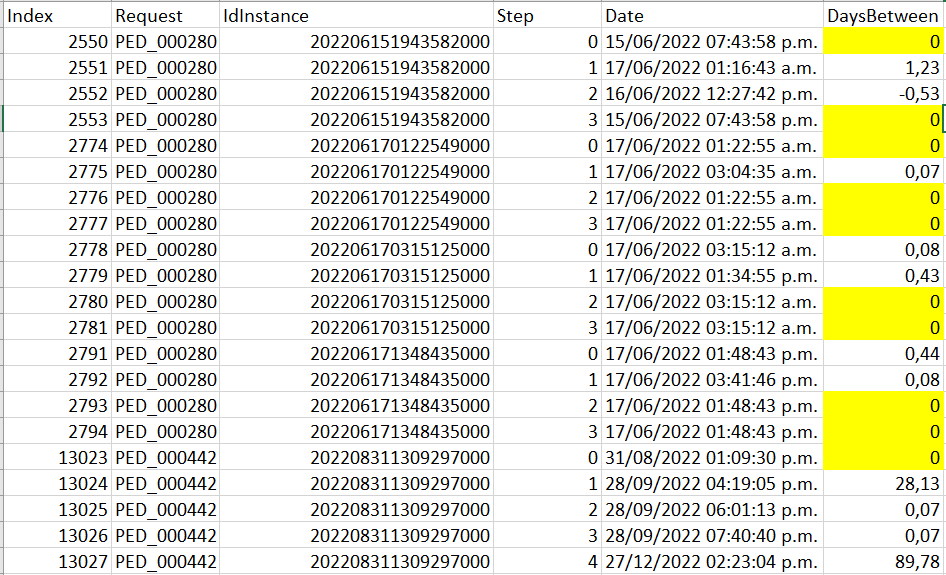
The results in the DaysBetween column that I highlight are what I need to get and are being ‘wrongly’ calculated by my current measure. What changes do I need to make in my measure to obtain these results? I think I shouldn’t use the index column, but then I should change all my measure 
Thanks in advance for your recommendations