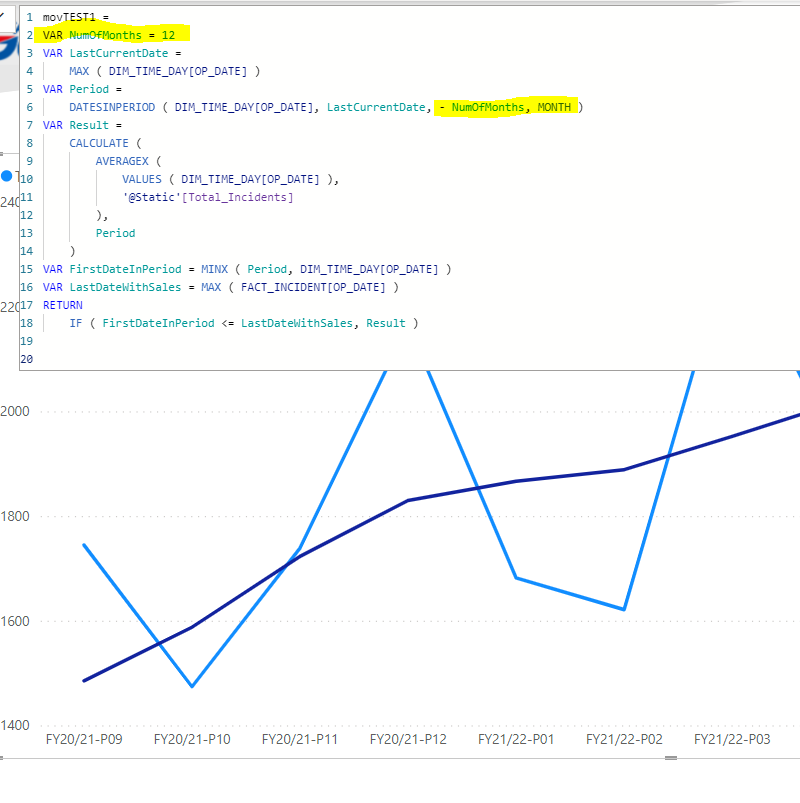
I am trying to figure out measure for my task - 12 months rolling average for Incidents.
I have column with unique Incidents numbers and I can not use SUM , I can only Count them.
This measure is not working correctly for this task:
Could you please help how to make it right . Sadly, but most of sources are in relation to Sales which you can easily SUM and I can not use - my data comes from Data Warehouse and can expect any changes from it
Hi @Iwona, I noticed you didn’t provide a PBIX file. Providing one will help users and experts find a solution to your inquiry faster and better.
A perfect initial question includes all of the following:
A clear explanation of the problem you are experiencing
A mockup of the results you want to achieve
Your current work-in-progress PBIX file
Your underlying data file (to allow us to go into Power Query if necessary to transform your data and/or data model – often DAX questions really end up being data modeling solutions)
@Iwona The reason for the pbix file is for the person assisting you to be able to see the whole picture. There could be measure that is conflicting with another one. Hard to say. But looking at your screenshot, you are using statistical aggregating functions such as MAX and MINX. MAX and MAXX behave differently. MAXX evaluates an expression for each row of a table and returns the largest value. MAXX( Table, Table[ColumnName]).
MAX just returns the largest value in a column. MAX ( ColumnName)
Perhaps you need to change the MAX to a MAXX. But again we are just throwing darts into the air without seeing the big picture.
On the rolling average, try using
SAMEPERIODLASTYEAR Date[Date]) instead of last date. If not, should it be -1 instead of 1, YEAR? Is your Fact table have a relationship with your Date Table?
Hi @Iwona, due to inactivity, a response on this post has been tagged as “Solution”. If you have any concern related to this topic, you can create a new thread.